> For the complete documentation index, see [llms.txt](https://docs.trada.io/llms.txt). Markdown versions of documentation pages are available by appending `.md` to page URLs; this page is available as [Markdown](https://docs.trada.io/connecting-accounts/partner-accounts.md).
# Partner accounts & badges
What a partner account is, how it is badged, and how it can unlock Free Starter.
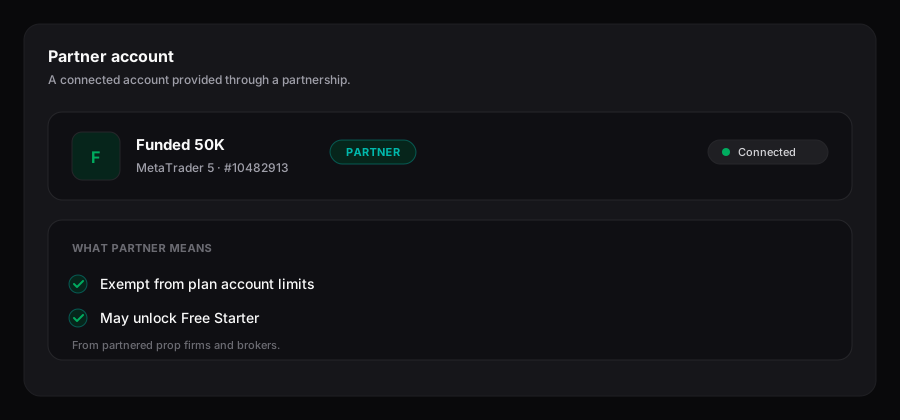
A partner account is a trading account you hold with one of Trada's partnered prop firms or brokers. When Trada recognizes it, the account carries a **PARTNER** badge, sits outside your plan's account limit, and can qualify you for Free Starter at no cost.
A partner account — badged, exempt from plan limits, and a path to Free Starter.
## Understand partner accounts
A partner account is any connected account whose prop firm or broker is on Trada's partner list. You connect it the same way as any other account — through the **Add Account** dialog on the Accounts page. Recognition is automatic: Trada matches the firm or broker and the account's details, then applies the badge and the limit exemption without any extra step from you.
{% hint style="info" %}
The partner list is expanding, so the firms and brokers that qualify change over time. Trada does not publish a fixed list here. If your account is with a partnered firm or broker and meets the criteria below, the **PARTNER** badge appears automatically once it is connected.
{% endhint %}
## Read the PARTNER badge
The **PARTNER** badge shows on an account row in the Accounts list whenever that account matches partner criteria. It is a status indicator only — it does not change how the account syncs, journals, or copies. Forex/CFD accounts and Futures trading accounts can both carry the badge.
## Stay exempt from account limits
Plan limits count your connected accounts across Forex and Futures combined. Partner accounts are excluded from that count, so they never consume a plan slot.
This matters when you are at your limit. When a plan is full, **Add Account** changes to **Limit Reached**, and the tooltip offers two paths: **Upgrade** to a higher plan, or **Add Partner Account** to connect a qualifying account without raising your paid tier.
## Qualify for Free Starter
A qualifying partner account can unlock **Free Starter** — Starter-tier features granted at $0. It runs as a rolling 30-day subscription that auto-renews while the account continues to meet the criteria. Connecting additional partnered accounts can extend it.
{% hint style="info" %}
**Qualifying criteria.** A **partnered prop firm** account must have a starting balance of **$50,000 or more**. A **partnered broker** account must hold a balance of **$500 or more** and stay active — a minimum of two trades per week. If an account stops meeting its criteria, Free Starter ends at the close of the current 30-day period.
{% endhint %}
{% stepper %}
{% step %}
### Connect a qualifying account
Open the **Add Account** dialog and connect a trading account held with a partnered prop firm or broker. See [Connect a Forex/CFD account](/connecting-accounts/connect-forex.md) or [Connect a Futures account](/connecting-accounts/connect-futures.md) for the connection steps.
{% endstep %}
{% step %}
### Meet the threshold
Confirm the account clears its bar — **$50,000+** starting balance for a prop firm account, or **$500+** balance with active trading for a broker account.
{% endstep %}
{% step %}
### Run Starter for 30 days
Once the account qualifies, Trada grants Starter features at no cost for a 30-day period that auto-renews while the account stays qualified. Full mechanics live in [Free Starter](/plans-and-billing/free-starter.md).
{% endstep %}
{% endstepper %}
## Related
* [Free Starter](/plans-and-billing/free-starter.md)
* [Connect a Forex/CFD account](/connecting-accounts/connect-forex.md)
* [Connect a Futures account](/connecting-accounts/connect-futures.md)
* [Plans & billing](/plans-and-billing/plans-billing.md)
---
# Agent Instructions
This documentation is published with GitBook. GitBook is the documentation platform designed so that both humans and AI agents can read, navigate, and reason over technical content effectively. Learn more at gitbook.com.
## Querying This Documentation
If you need additional information that is not directly available in this page, you can query the documentation dynamically by asking a question.
Perform an HTTP GET request on the current page URL with the `ask` query parameter, and the optional `goal` query parameter:
```
GET https://docs.trada.io/connecting-accounts/partner-accounts.md?ask=&goal=
```
`ask` is the immediate question: it should be specific, self-contained, and written in natural language.
`goal` is optional and describes the broader end goal you are ultimately trying to accomplish on behalf of the user. GitBook uses it to tailor the answer towards what is most useful for that goal.
The response will contain a direct answer to the question and relevant excerpts and sources from the documentation.
Use this mechanism when the answer is not explicitly present in the current page, you need clarification or additional context, or you want to retrieve related documentation sections.