> For the complete documentation index, see [llms.txt](https://docs.trada.io/llms.txt). Markdown versions of documentation pages are available by appending `.md` to page URLs; this page is available as [Markdown](https://docs.trada.io/copy-trading/configure-receiver.md).
# Add & configure a receiver
Add follower accounts to a copier and configure each one independently across three tabs — Trading, SL & TP, and Protection.
A **receiver** is a follower account that copies the sender. A copier can have many receivers, and each one is configured independently — its own size, its own stop-loss and take-profit handling, and its own risk limits. No receiver inherits another's settings.
## Add a receiver
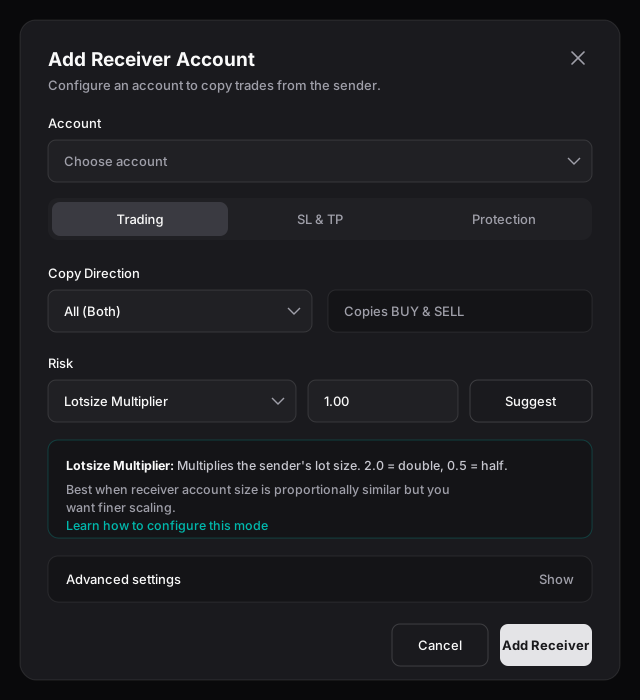
In the copier's **Receiver Accounts** section, choose **Add Receiver** (enabled once a sender exists). The dialog has three tabs:
The Add Receiver dialog — the Trading tab, where you set the account, copy direction, and lot-sizing mode.
| Tab | What you set |
| -------------- | ------------------------------------------------------------------------------------------------------------------------------------------------ |
| **Trading** | Account, copy direction, lot-sizing mode, and advanced execution options. |
| **SL & TP** | How stop-loss and take-profit carry over to this receiver. See [Stop-loss & take-profit modes](/copy-trading/configure-receiver/sl-tp-modes.md). |
| **Protection** | Daily and Overall risk limits and the actions they trigger. See [Risk protection](/copy-trading/configure-receiver/risk-protection.md). |
## Trading tab
**Account** — pick from accounts matching the copier's market type, excluding the sender and any account already added as a receiver.
**Copy direction** — choose how the sender's trades map onto this receiver:
* **Both** (default) — copy buys and sells.
* **Buy Only** — copy buy trades only.
* **Sell Only** — copy sell trades only.
**Lot-sizing mode** — how each trade is sized on this receiver. There are five modes, covered in [Lot-sizing modes](/copy-trading/configure-receiver/lot-sizing-modes.md).
### Advanced settings
Each advanced option has an in-app explainer. Open the collapsible **Advanced** section to set:
| Setting | What it does |
| --------------------------- | ----------------------------------------------------------------------------------------------------------------------------------------- |
| **Max Lot Size** | Caps the lot size after the multiplier is applied. Larger computed sizes are reduced to this value. |
| **Max Slippage (pips)** | Skips the trade if the receiver's entry price is worse than the sender's by more than this amount. |
| **Force Minimum Lot Size** | Bumps a calculated lot up to the broker's minimum when it falls below the threshold. Useful with risk-based sizing on a smaller receiver. |
| **Reverse Positions** | Copies in the opposite direction — buys become sells and sells become buys. |
| **Copy Placed Orders** | Immediately syncs the sender's existing pending orders to this receiver. Off by default, so only new orders are copied. |
| **Copy Only Market Orders** | Mirrors market executions only; pending limit and stop orders are ignored. |
{% hint style="warning" %}
**Reverse Positions is disabled automatically on prop firm accounts.** It conflicts with prop firm trading rules and terms of service, so Trada blocks it for those accounts with an explanatory message.
{% endhint %}
## Edit a receiver
Use the **Edit** (pencil) action on a receiver row to reopen the same three tabs with current values. The **account itself is locked** — to copy to a different account, remove this receiver and add the new one. Saved changes take effect immediately; trades already open are not retroactively changed, and new trades use the new settings.
## The receiver table
Each receiver row shows balance, daily P\&L, open orders, open P\&L (real-time), its configured multiplier, and its copy direction, plus per-row actions:
* **Edit** — reopen the configuration tabs.
* **Flatten** — close all open positions on this receiver (confirmation required).
* **Remove** — take the receiver off the copier. Open trades stay open; other receivers and the sender are unaffected.
## Related
* [Lot-sizing modes](/copy-trading/configure-receiver/lot-sizing-modes.md)
* [Stop-loss & take-profit modes](/copy-trading/configure-receiver/sl-tp-modes.md)
* [Risk protection](/copy-trading/configure-receiver/risk-protection.md)
* [Symbol mapping](/copy-trading/symbol-mapping.md)
---
# Agent Instructions
This documentation is published with GitBook. GitBook is the documentation platform designed so that both humans and AI agents can read, navigate, and reason over technical content effectively. Learn more at gitbook.com.
## Querying This Documentation
If you need additional information that is not directly available in this page, you can query the documentation dynamically by asking a question.
Perform an HTTP GET request on the current page URL with the `ask` query parameter, and the optional `goal` query parameter:
```
GET https://docs.trada.io/copy-trading/configure-receiver.md?ask=&goal=
```
`ask` is the immediate question: it should be specific, self-contained, and written in natural language.
`goal` is optional and describes the broader end goal you are ultimately trying to accomplish on behalf of the user. GitBook uses it to tailor the answer towards what is most useful for that goal.
The response will contain a direct answer to the question and relevant excerpts and sources from the documentation.
Use this mechanism when the answer is not explicitly present in the current page, you need clarification or additional context, or you want to retrieve related documentation sections.