> For the complete documentation index, see [llms.txt](https://docs.trada.io/llms.txt). Markdown versions of documentation pages are available by appending `.md` to page URLs; this page is available as [Markdown](https://docs.trada.io/copy-trading/copier-logs.md).
# Copier logs
Read the chronological record of everything a copier does — copies, closes, failures, and protection triggers — and filter or export it.
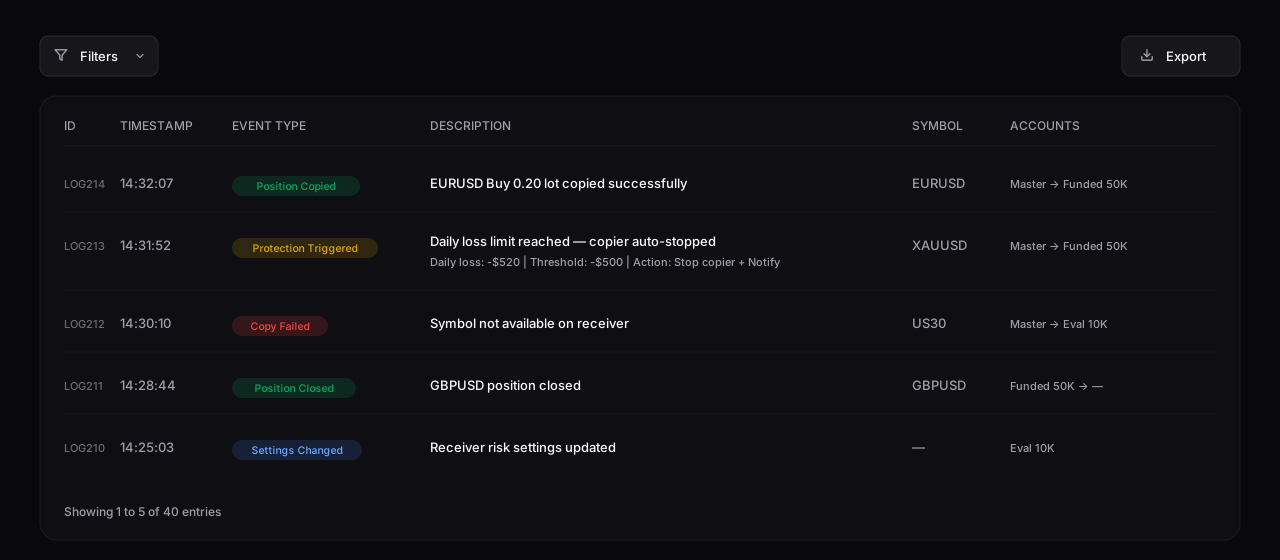
The **Copier Logs** tab on a copier's detail page records every action it takes: successful copies, closes, failures, protection triggers, and configuration changes. It's where you go to confirm a trade copied, or to find out why one didn't.
The Copier Logs tab — every event with its timestamp, type, and detail, including protection triggers and failures.
## Event types
| Event | Meaning | Indicator |
| ---------------------------- | --------------------------------------------------- | --------- |
| **Position Copied** | A trade was copied to a receiver. | Success |
| **Position Closed** | A trade was closed on an account. | Success |
| **Copy Failed** | A copy attempt failed. | Failed |
| **Protection Triggered** | A protection threshold was reached. | Warning |
| **Copier Action** | A manual action (start, stop, and so on). | Info |
| **Symbol Mapping** | A symbol mapping changed. | Info |
| **Connection Issue** | An account connection problem. | Warning |
| **Settings Changed** | Copier settings were modified. | Info |
| **Receiver Added / Removed** | A receiver was added to or removed from the copier. | Info |
## Reading an entry
Each row carries a timestamp, the event type, a description, the symbol, the from/to accounts, and a related trade ID where applicable. The description often includes the detail that matters — for a protection trigger, for example:
```
Daily loss limit reached — Copier auto-stopped
Daily loss: -$520 | Threshold: -$500 | Action: Stop copier + Notify
```
Logs are ordered newest first.
## Filter and export
* **Filters** — narrow by event type, account, symbol, and date range. Filters combine (all conditions must match) and persist for your session.
* **Export** — download the filtered logs as a CSV file for your own records.
{% hint style="info" %}
When a trade doesn't appear on a receiver, the logs are the fastest way to find out why — look for a **Copy Failed**, **Connection Issue**, or **Protection Triggered** entry around that time. See [Troubleshooting copiers](/copy-trading/troubleshooting.md).
{% endhint %}
## Related
* [Troubleshooting copiers](/copy-trading/troubleshooting.md)
* [Risk protection](/copy-trading/configure-receiver/risk-protection.md)
* [Symbol mapping](/copy-trading/symbol-mapping.md)
---
# Agent Instructions
This documentation is published with GitBook. GitBook is the documentation platform designed so that both humans and AI agents can read, navigate, and reason over technical content effectively. Learn more at gitbook.com.
## Querying This Documentation
If you need additional information that is not directly available in this page, you can query the documentation dynamically by asking a question.
Perform an HTTP GET request on the current page URL with the `ask` query parameter, and the optional `goal` query parameter:
```
GET https://docs.trada.io/copy-trading/copier-logs.md?ask=&goal=
```
`ask` is the immediate question: it should be specific, self-contained, and written in natural language.
`goal` is optional and describes the broader end goal you are ultimately trying to accomplish on behalf of the user. GitBook uses it to tailor the answer towards what is most useful for that goal.
The response will contain a direct answer to the question and relevant excerpts and sources from the documentation.
Use this mechanism when the answer is not explicitly present in the current page, you need clarification or additional context, or you want to retrieve related documentation sections.