> For the complete documentation index, see [llms.txt](https://docs.trada.io/llms.txt). Markdown versions of documentation pages are available by appending `.md` to page URLs; this page is available as [Markdown](https://docs.trada.io/copy-trading/create-a-copier.md).
# Create a copier
Create a copier from the Copy Trading list view, then manage your copiers — start and stop them, duplicate, and delete.
A copier is the container that links a sender to its receivers. You create and manage copiers from the **Copy Trading** list view.
## Create a copier
{% stepper %}
{% step %}
### Open Copy Trading
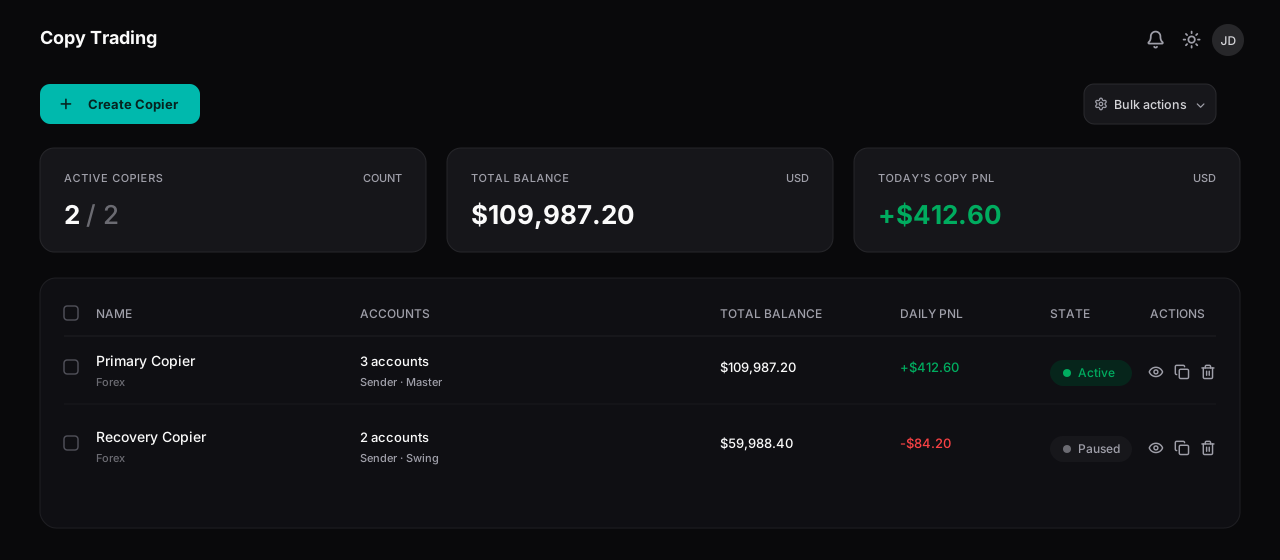
Go to **Copy Trading**. The list shows every copier you've configured, with its market type, account count, balance, daily P\&L, and status.
{% endstep %}
{% step %}
### Choose Create Copier
Select **Create Copier**. A new, empty copier is added to the list immediately with an auto-generated name (you can rename it later in **Settings**). You stay on the list view.
{% endstep %}
{% step %}
### Configure it
Open the copier and [add a sender](/copy-trading/sender-account.md), then [add one or more receivers](/copy-trading/configure-receiver.md). A copier can only be started once it has both.
{% endstep %}
{% endstepper %}
{% hint style="warning" %}
You can't create a second copier while an empty, unconfigured one already exists. Finish configuring the existing copier first, or delete it. At your plan's copier limit, **Create Copier** opens the upgrade flow instead.
{% endhint %}
## The copiers list
The Copy Trading list — each copier with its accounts, balance, daily P&L, and an interactive status toggle.
Each row shows:
| Column | What it shows |
| ----------------- | ---------------------------------------------------------------------- |
| **Name** | The copier's name and a Forex or Futures badge. |
| **Accounts** | Total accounts (sender + receivers) and the sender's name. |
| **Total Balance** | Combined balance across the copier's accounts, with a 7-day sparkline. |
| **Daily P\&L** | Today's combined P\&L, with a 7-day sparkline. |
| **Status** | An interactive **Active / Paused** toggle. |
| **Actions** | A menu (View, Duplicate, Delete) and a **Settings** button. |
Click anywhere on a row (except the checkbox, status toggle, or action buttons) to open the copier's detail page.
## Start and stop a copier
The **Status** toggle starts and pauses a copier:
* **Active** shows a green badge; hover to reveal **Stop**.
* **Paused** shows a muted badge; hover to reveal **Start**.
* A copier that isn't fully configured (missing a sender or receiver) can't be started — the toggle is disabled with the tooltip "Configure sender and receiver to start".
To act on every copier at once, open **Controls** for **Start All**, **Stop All**, **Close All Orders**, and **Flatten All**. See [Copier states & lifecycle](/copy-trading/lifecycle.md).
## Duplicate a copier
**Duplicate** (in the row's action menu) creates an exact copy — name, sender, all receivers, settings, and symbol mappings. The duplicate is named "\[Original] (Copy)" and starts **paused**. If you're at your copier limit, duplicating opens the upgrade flow instead.
## Delete a copier
**Delete** removes the copier after a confirmation.
{% hint style="danger" %}
Deleting a copier does **not** close open trades. Positions on the sender and receivers stay open — flatten them manually first if you want them closed.
{% endhint %}
## Related
* [The sender account](/copy-trading/sender-account.md)
* [Add & configure a receiver](/copy-trading/configure-receiver.md)
* [Copier states & lifecycle](/copy-trading/lifecycle.md)
---
# Agent Instructions
This documentation is published with GitBook. GitBook is the documentation platform designed so that both humans and AI agents can read, navigate, and reason over technical content effectively. Learn more at gitbook.com.
## Querying This Documentation
If you need additional information that is not directly available in this page, you can query the documentation dynamically by asking a question.
Perform an HTTP GET request on the current page URL with the `ask` query parameter, and the optional `goal` query parameter:
```
GET https://docs.trada.io/copy-trading/create-a-copier.md?ask=&goal=
```
`ask` is the immediate question: it should be specific, self-contained, and written in natural language.
`goal` is optional and describes the broader end goal you are ultimately trying to accomplish on behalf of the user. GitBook uses it to tailor the answer towards what is most useful for that goal.
The response will contain a direct answer to the question and relevant excerpts and sources from the documentation.
Use this mechanism when the answer is not explicitly present in the current page, you need clarification or additional context, or you want to retrieve related documentation sections.