> For the complete documentation index, see [llms.txt](https://docs.trada.io/llms.txt). Markdown versions of documentation pages are available by appending `.md` to page URLs; this page is available as [Markdown](https://docs.trada.io/copy-trading/sender-account.md).
# The sender account
Set the master account a copier copies from. Each copier has exactly one sender, and the sender sets the copier's market type.
The **sender** is the master account a copier copies from. Every copier has exactly one sender, and all of its trades trigger copies to the receivers.
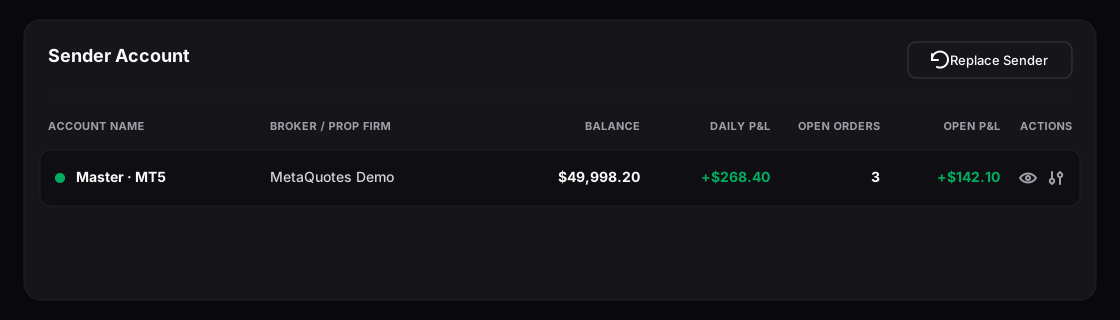
The Sender section — the single master account a copier copies from.
## Add a sender
In the copier's **Sender** section, choose **Add Sender**. Pick an account from the dropdown — it lists your connected accounts, filtered to the copier's market type and excluding any account already used as a receiver here. Confirm to set it.
{% hint style="info" %}
The first sender you add sets the copier's market type. A Forex account makes a Forex copier; a Futures account makes a Futures copier. From then on, only matching accounts appear in the sender and receiver pickers.
{% endhint %}
## What the sender shows
Once set, the sender row displays:
| Field | Meaning |
| ---------------------- | --------------------------------------------------------------------------------------- |
| **Account Name** | Your account name, with a connection indicator (green = connected, red = disconnected). |
| **Broker / Prop Firm** | The broker or prop firm behind the account. |
| **Balance** | Current account balance. |
| **Daily P\&L** | Today's profit or loss on this account. |
| **Open Orders** | Number of currently open positions (updates in real time). |
| **Open P\&L** | Unrealised P\&L from open positions (updates in real time over WebSocket). |
If the account shows a red indicator, it's disconnected — use **Resolve** to reconnect it on the [Accounts](/connecting-accounts/connecting-accounts.md) page. While disconnected, copy attempts may fail and are recorded in the [copier logs](/copy-trading/copier-logs.md).
## Replace a sender
Use **Replace Sender** to swap in a different master account. Receivers are unaffected and stay configured.
{% hint style="warning" %}
If the copier already has receivers, you can only replace the sender with an account of the **same** market type — you can't turn a Forex copier into a Futures one while receivers exist. Replacing while the copier is active pauses copying for a moment as the new sender takes effect.
{% endhint %}
## Flatten or remove the sender
* **Flatten** closes all open positions on the sender account only. Receiver positions are untouched. You'll confirm first, since it can't be undone.
* **Remove** takes the sender off the copier. Receivers remain configured and **open trades stay open**. The copier can't start again until a new sender is added.
## Related
* [Add & configure a receiver](/copy-trading/configure-receiver.md)
* [Copier states & lifecycle](/copy-trading/lifecycle.md)
* [Syncing, status & troubleshooting](/connecting-accounts/syncing-troubleshooting.md)
---
# Agent Instructions
This documentation is published with GitBook. GitBook is the documentation platform designed so that both humans and AI agents can read, navigate, and reason over technical content effectively. Learn more at gitbook.com.
## Querying This Documentation
If you need additional information that is not directly available in this page, you can query the documentation dynamically by asking a question.
Perform an HTTP GET request on the current page URL with the `ask` query parameter, and the optional `goal` query parameter:
```
GET https://docs.trada.io/copy-trading/sender-account.md?ask=&goal=
```
`ask` is the immediate question: it should be specific, self-contained, and written in natural language.
`goal` is optional and describes the broader end goal you are ultimately trying to accomplish on behalf of the user. GitBook uses it to tailor the answer towards what is most useful for that goal.
The response will contain a direct answer to the question and relevant excerpts and sources from the documentation.
Use this mechanism when the answer is not explicitly present in the current page, you need clarification or additional context, or you want to retrieve related documentation sections.