> For the complete documentation index, see [llms.txt](https://docs.trada.io/llms.txt). Markdown versions of documentation pages are available by appending `.md` to page URLs; this page is available as [Markdown](https://docs.trada.io/copy-trading/symbol-mapping.md).
# Symbol mapping
Match the sender's instrument names to each receiver's, so a master symbol copies correctly even when brokers name it differently.
Brokers don't always name the same instrument the same way — gold might be `XAUUSD` on one account and `GOLD` on another. **Symbol mapping** tells Trada which symbol on each receiver corresponds to each of the sender's symbols, so trades copy to the right instrument.
Open it from a copier's detail page with **Map Symbols** (enabled once a sender is configured). Mappings are specific to that copier.
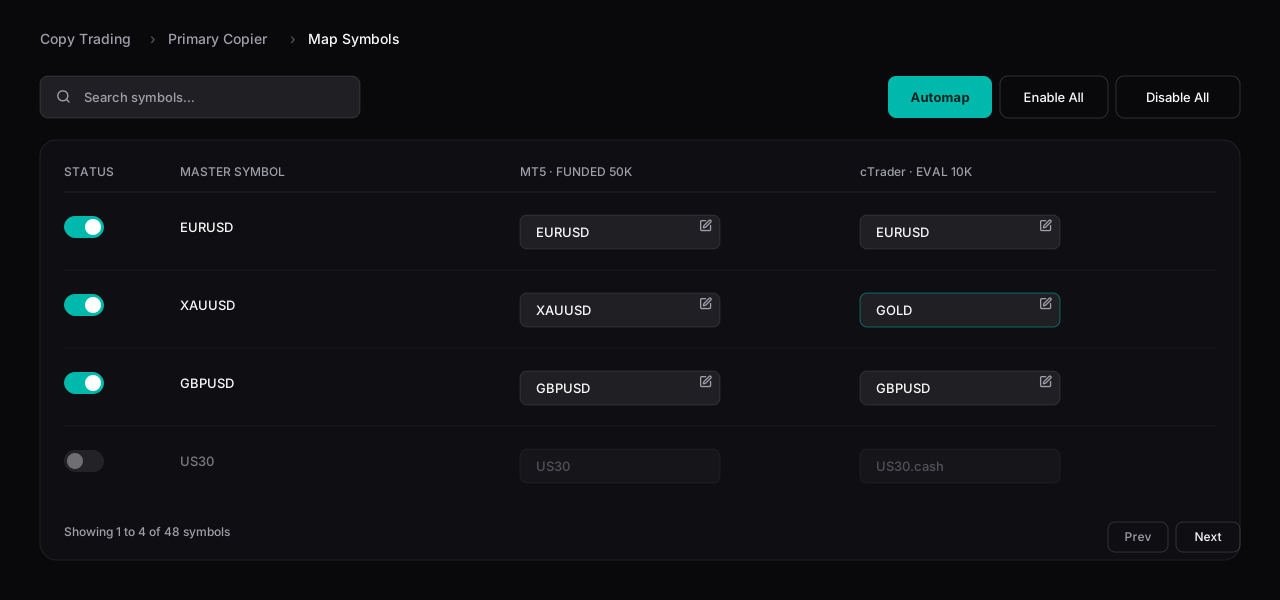
The Map Symbols table — each master symbol mapped per receiver. Here XAUUSD maps to GOLD on the second account.
## The mapping table
Each row is one of the sender's symbols (the **Master Symbol**), with a column for every receiver showing the symbol it maps to on that account.
| Column | What it does |
| ----------------- | ---------------------------------------------- |
| **Status** | Enable or disable copying for this symbol. |
| **Master Symbol** | The sender's symbol (read-only). |
| **\[Receiver]** | The mapped symbol on each receiver — editable. |
## Map symbols
* **Automap** sets every receiver's mapping to match the master symbol name, with a progress bar while it runs. It can also suggest close matches (such as `GOLD` for `XAUUSD`).
* To set a mapping by hand, choose **Edit** on a cell and pick the receiver's symbol from the dropdown of instruments available on that broker.
Changes **save immediately** — there's no Save button — and each change confirms with a toast. Use the search box to filter by master symbol name.
## Enable or disable a symbol
The **Status** toggle controls whether a symbol copies at all:
* **Enabled** — trades on this symbol copy to the receivers.
* **Disabled** — trades on this symbol are not copied; the row dims. Use **Enable All** or **Disable All** to switch every symbol at once.
This gives you precise control over which instruments a copier actively replicates.
{% hint style="info" %}
If a receiver's broker doesn't offer a mapped symbol, that instrument can't copy to that account. Check the mapping when a specific symbol fails to copy — the [copier logs](/copy-trading/copier-logs.md) will show the failure.
{% endhint %}
## Related
* [Add & configure a receiver](/copy-trading/configure-receiver.md)
* [Copier logs](/copy-trading/copier-logs.md)
* [Troubleshooting copiers](/copy-trading/troubleshooting.md)
---
# Agent Instructions
This documentation is published with GitBook. GitBook is the documentation platform designed so that both humans and AI agents can read, navigate, and reason over technical content effectively. Learn more at gitbook.com.
## Querying This Documentation
If you need additional information that is not directly available in this page, you can query the documentation dynamically by asking a question.
Perform an HTTP GET request on the current page URL with the `ask` query parameter, and the optional `goal` query parameter:
```
GET https://docs.trada.io/copy-trading/symbol-mapping.md?ask=&goal=
```
`ask` is the immediate question: it should be specific, self-contained, and written in natural language.
`goal` is optional and describes the broader end goal you are ultimately trying to accomplish on behalf of the user. GitBook uses it to tailor the answer towards what is most useful for that goal.
The response will contain a direct answer to the question and relevant excerpts and sources from the documentation.
Use this mechanism when the answer is not explicitly present in the current page, you need clarification or additional context, or you want to retrieve related documentation sections.