> For the complete documentation index, see [llms.txt](https://docs.trada.io/llms.txt). Markdown versions of documentation pages are available by appending `.md` to page URLs; this page is available as [Markdown](https://docs.trada.io/copy-trading/troubleshooting.md).
# Troubleshooting copiers
Work out why a trade didn't copy and how to fix it — disconnections, paused copiers, protection triggers, symbol mappings, slippage, and order-type rules.
When a trade doesn't appear on a receiver, the cause is almost always recorded in the [copier logs](/copy-trading/copier-logs.md). Start there, then match what you see to the cases below.
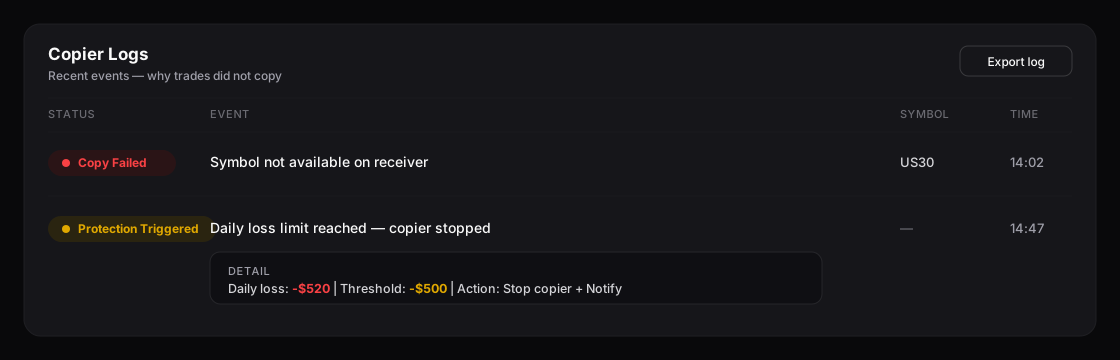
Copier logs pinpoint why a trade did not copy — failures and protection triggers.
## A trade didn't copy
| What you see | Likely cause | Fix |
| ------------------------------------------------------------------------ | ------------------------------------------------------------------------------------------- | -------------------------------------------------------------------------------------------------------------------- |
| **Copier Action** showing the copier paused, or a disabled status toggle | The copier is paused, or missing a sender/receiver. | Confirm a sender and at least one receiver are set, then switch the copier to **Active**. |
| **Connection Issue**, red account indicator | The sender or receiver is disconnected. | Use **Resolve** on the account row to reconnect on the [Accounts](/connecting-accounts/connecting-accounts.md) page. |
| **Copy Failed** referencing a symbol | The symbol isn't mapped on that receiver, or the broker doesn't offer it. | Check [Symbol mapping](/copy-trading/symbol-mapping.md); set or correct the receiver's symbol. |
| Nothing logged for that symbol | The symbol is **disabled** in symbol mapping. | Re-enable it in the mapping table's **Status** column. |
| **Copy Failed** mentioning slippage | The receiver's price was worse than the sender's by more than **Max Slippage**. | Raise or clear Max Slippage in the receiver's advanced settings. |
| Pending orders never copy | **Copy Only Market Orders** is on, or **Copy Placed Orders** is off. | Adjust these in the receiver's [advanced settings](/copy-trading/configure-receiver.md). |
| One side (buys or sells) never copies | The receiver's **copy direction** is set to Buy Only or Sell Only. | Set copy direction to **Both** if you want both sides. |
| Trades stopped after a loss/profit level | A **Protection Triggered** entry — a threshold stopped the copier or flattened the account. | Review [Risk protection](/copy-trading/configure-receiver/risk-protection.md) thresholds for that receiver. |
| Nothing copies at certain times | **Working hours** restrict the copier to set windows. | Check or adjust [Working hours & scheduling](/copy-trading/working-hours.md). |
## Sizing looks wrong on a receiver
* The receiver may be on a different [lot-sizing mode](/copy-trading/configure-receiver/lot-sizing-modes.md) than you expect — check the **Multiplier** column.
* **Max Lot Size** caps the result after sizing; a capped trade is smaller than the raw calculation.
* **Fixed % Risk** needs a stop-loss to size against — without one, sizing can't be calculated. See [Lot-sizing modes](/copy-trading/configure-receiver/lot-sizing-modes.md).
## Reverse Positions is greyed out
Reverse Positions is **disabled automatically on prop firm accounts** because it conflicts with prop firm rules and terms of service. This is by design and can't be overridden for those accounts.
## A position didn't close when I expected
Pausing or deleting a copier, and removing a sender or receiver, all leave **open trades open**. Use **Flatten** on the account, or the [global controls](/copy-trading/lifecycle.md), to close positions deliberately.
## Related
* [Copier logs](/copy-trading/copier-logs.md)
* [Risk protection](/copy-trading/configure-receiver/risk-protection.md)
* [Symbol mapping](/copy-trading/symbol-mapping.md)
* [Syncing, status & troubleshooting](/connecting-accounts/syncing-troubleshooting.md)
---
# Agent Instructions
This documentation is published with GitBook. GitBook is the documentation platform designed so that both humans and AI agents can read, navigate, and reason over technical content effectively. Learn more at gitbook.com.
## Querying This Documentation
If you need additional information that is not directly available in this page, you can query the documentation dynamically by asking a question.
Perform an HTTP GET request on the current page URL with the `ask` query parameter, and the optional `goal` query parameter:
```
GET https://docs.trada.io/copy-trading/troubleshooting.md?ask=&goal=
```
`ask` is the immediate question: it should be specific, self-contained, and written in natural language.
`goal` is optional and describes the broader end goal you are ultimately trying to accomplish on behalf of the user. GitBook uses it to tailor the answer towards what is most useful for that goal.
The response will contain a direct answer to the question and relevant excerpts and sources from the documentation.
Use this mechanism when the answer is not explicitly present in the current page, you need clarification or additional context, or you want to retrieve related documentation sections.