> For the complete documentation index, see [llms.txt](https://docs.trada.io/llms.txt). Markdown versions of documentation pages are available by appending `.md` to page URLs; this page is available as [Markdown](https://docs.trada.io/copy-trading/working-hours.md).
# Working hours & scheduling
Restrict when a copier is allowed to copy trades using daily time blocks, and optionally close open positions when the trading period ends.
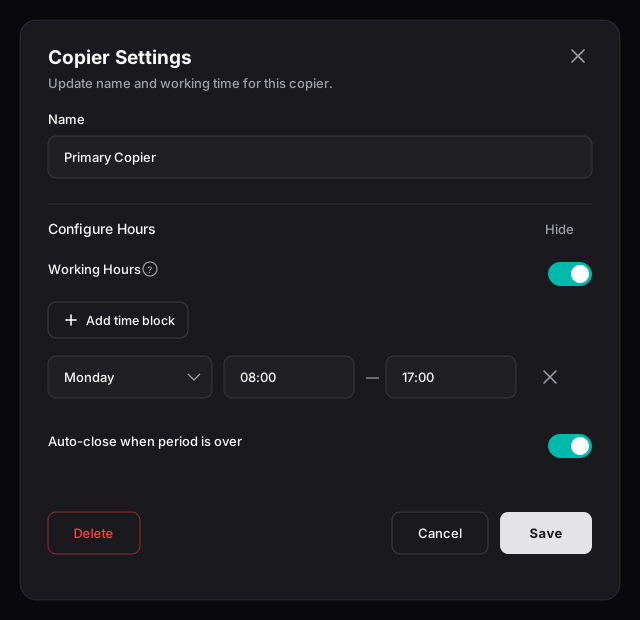
Working hours restrict **when a copier copies trades**. They're set per copier in **Copier Settings** (the gear icon on the copier's detail page), alongside the copier's name.
By default a copier has no schedule and copies 24/7. Add working hours to limit it to specific windows — for example, only during your main session.
Copier Settings — the copier name plus Working Hours, with a daily time block and the auto-close option.
## Set a schedule
{% stepper %}
{% step %}
### Open Copier Settings
On the copier's detail page, choose **Settings**, then expand **Configure Hours**.
{% endstep %}
{% step %}
### Turn on Working Hours
Enable the **Working Hours** toggle. While it's off, the schedule controls are dimmed and the copier runs without time restrictions.
{% endstep %}
{% step %}
### Add time blocks
Choose **Add time block** and set a **Day**, **Start Time**, and **End Time**. Add as many blocks as you need — multiple per day are fine, and blocks may overlap. The copier copies during any active block.
{% endstep %}
{% step %}
### Save
Save the dialog. The schedule takes effect immediately.
{% endstep %}
{% endstepper %}
Start time must be before end time within a block. Times follow the conventions in [Conventions](/reference/conventions.md).
## Auto-close at period end
Enable **Auto-close when period is over** to close open positions when a working-hours window ends:
* **On** — when a period ends, all open positions on the copier's accounts (sender and receivers) are closed.
* **Off** — positions stay open when the window ends, but no new trades are copied until the next window.
{% hint style="warning" %}
With Working Hours enabled and **no** time blocks defined, the copier effectively never copies — there are no active windows. The dialog shows a reminder when this is the case.
{% endhint %}
## Related
* [Copier states & lifecycle](/copy-trading/lifecycle.md)
* [Risk protection](/copy-trading/configure-receiver/risk-protection.md)
* [Create a copier](/copy-trading/create-a-copier.md)
---
# Agent Instructions
This documentation is published with GitBook. GitBook is the documentation platform designed so that both humans and AI agents can read, navigate, and reason over technical content effectively. Learn more at gitbook.com.
## Querying This Documentation
If you need additional information that is not directly available in this page, you can query the documentation dynamically by asking a question.
Perform an HTTP GET request on the current page URL with the `ask` query parameter, and the optional `goal` query parameter:
```
GET https://docs.trada.io/copy-trading/working-hours.md?ask=&goal=
```
`ask` is the immediate question: it should be specific, self-contained, and written in natural language.
`goal` is optional and describes the broader end goal you are ultimately trying to accomplish on behalf of the user. GitBook uses it to tailor the answer towards what is most useful for that goal.
The response will contain a direct answer to the question and relevant excerpts and sources from the documentation.
Use this mechanism when the answer is not explicitly present in the current page, you need clarification or additional context, or you want to retrieve related documentation sections.