> For the complete documentation index, see [llms.txt](https://docs.trada.io/llms.txt). Markdown versions of documentation pages are available by appending `.md` to page URLs; this page is available as [Markdown](https://docs.trada.io/getting-started/what-is-trada.md).
# What is Trada
What Trada does, who it's for, and how its five layers fit together — from connecting accounts to copying trades, journaling, and reporting.
Trada is **trade-copier and journaling infrastructure** for traders running multiple accounts. It connects to the platforms and brokers you already use, replicates trades from one master account to your other accounts in real time, applies per-account risk controls, and logs every trade into a structured journal for review.
You make the trading decisions. Trada runs everything after the decision — copy, risk enforcement, journaling, and reporting — across all of your accounts from one place.
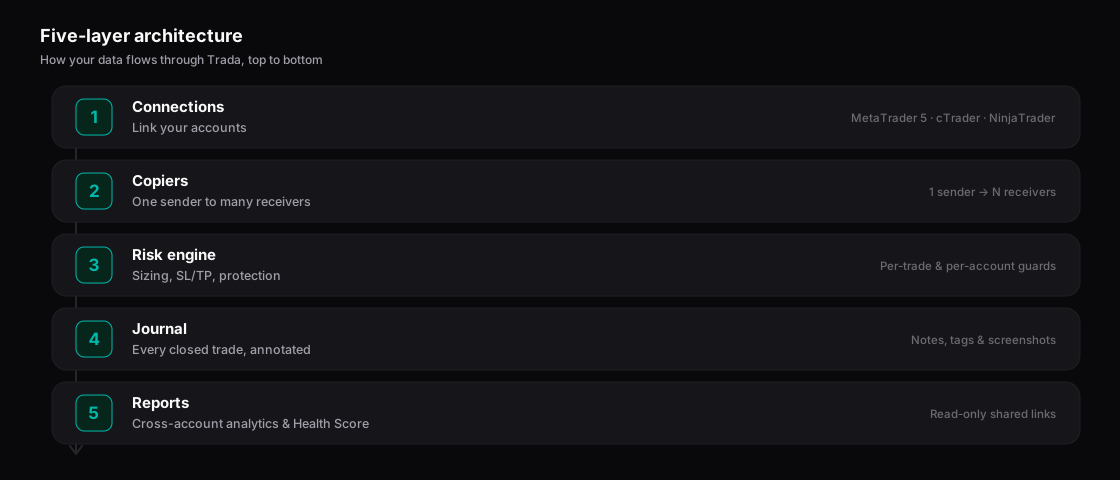
Trada’s five layers, from connecting accounts to reports.
## What Trada is not
* **Not a broker or trading platform.** Trada does not hold funds or execute orders on its own venue. It sits between accounts you already own.
* **Not an investment adviser.** Trada gives you no trade signals and no recommendations. It is software; you retain all trading responsibility.
* **Not a challenge tool.** Trada is what serious traders use to operate funded accounts — not a way to optimise a prop firm evaluation.
## Who it's for
Trada is built first for **prop firm traders running multiple accounts** across platforms — people who have moved past the evaluation stage and are managing real capital under different rule sets. It also fits:
* Traders scaling from one funded account to several across one or more firms.
* People informally managing capital for others who need separate accounts, independent risk controls, and shared reports.
* Multi-account retail traders tired of EA-and-VPS setups.
## How the pieces fit together
Trada is organised in five layers. Each layer feeds the next, with no manual export or import between them.
| Layer | What it does |
| --------------- | --------------------------------------------------------------------------------------------------------------------------------------------------------------------------------------------------------------------------------------------------------------------------- |
| **Connections** | Link your trading accounts. One account is one trading account on one platform. Forex is a flat list; Futures is nested (one login can expose several trading accounts). |
| **Copiers** | A **copier** maps one **sender** (master) to one or more **receivers** (followers). One market type per copier — Forex and Futures never mix. |
| **Risk engine** | Per-receiver lot sizing (five modes), stop-loss and take-profit handling (three modes each), and Daily plus Overall protection thresholds with three configurable actions: notify, stop the copier, flatten the account. Working hours and symbol filters apply per copier. |
| **Journal** | Every closed trade auto-logs. You annotate with a rating, emotional state, notes, and a strategy tag. Period journals aggregate by day, week, and month. |
| **Reports** | Cross-account analytics: win rate, profit factor, expectancy, drawdown, and a six-metric Trading Health Score, with instrument and time breakdowns. |
Around these sits the commercial layer — plans and billing, the Free Starter partner unlock for qualifying funded traders, shareable reports, and the deals marketplace.
## Where to go next
{% stepper %}
{% step %}
### Learn the vocabulary
Read [Core concepts](/getting-started/core-concepts.md) so the rest of the docs read clearly.
{% endstep %}
{% step %}
### Set things up
Follow the [Quickstart](/getting-started/quickstart.md) to connect an account and run your first copier.
{% endstep %}
{% step %}
### Go deeper on the core feature
[Copy trading](/copy-trading/copy-trading.md) is the most-used part of Trada and where most configuration lives.
{% endstep %}
{% endstepper %}
## Related
* [Core concepts](/getting-started/core-concepts.md)
* [Quickstart](/getting-started/quickstart.md)
* [The operator model](/why-trada/why-trada.md)
***
Trading carries risk of loss. See [Risk disclaimer & legal](/reference/legal.md).
---
# Agent Instructions
This documentation is published with GitBook. GitBook is the documentation platform designed so that both humans and AI agents can read, navigate, and reason over technical content effectively. Learn more at gitbook.com.
## Querying This Documentation
If you need additional information that is not directly available in this page, you can query the documentation dynamically by asking a question.
Perform an HTTP GET request on the current page URL with the `ask` query parameter, and the optional `goal` query parameter:
```
GET https://docs.trada.io/getting-started/what-is-trada.md?ask=&goal=
```
`ask` is the immediate question: it should be specific, self-contained, and written in natural language.
`goal` is optional and describes the broader end goal you are ultimately trying to accomplish on behalf of the user. GitBook uses it to tailor the answer towards what is most useful for that goal.
The response will contain a direct answer to the question and relevant excerpts and sources from the documentation.
Use this mechanism when the answer is not explicitly present in the current page, you need clarification or additional context, or you want to retrieve related documentation sections.