> For the complete documentation index, see [llms.txt](https://docs.trada.io/llms.txt). Markdown versions of documentation pages are available by appending `.md` to page URLs; this page is available as [Markdown](https://docs.trada.io/journal/strategies.md).
# Strategies & checklists
Define named strategies with execution settings, risk settings, and checklists, with auto-computed metrics.
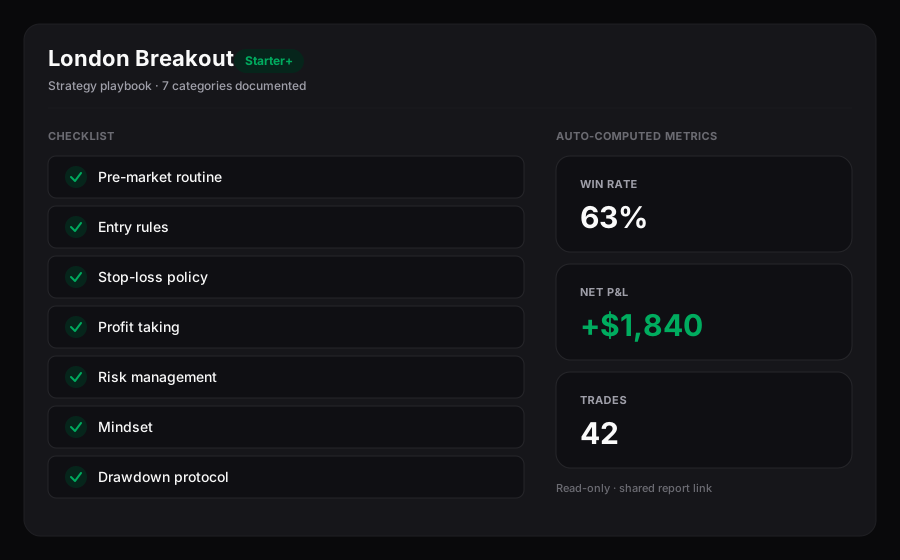
A strategy is a named record that pairs your execution settings and risk settings with checklists across seven categories. Once trades are tagged to it, Trada auto-computes a set of metrics from those trades so you can see how the process is running.
{% hint style="info" %}
Strategies are available on **Starter** and above. On **Free** and expired plans the strategies list shows for about two seconds, then a blur overlay appears with an upgrade prompt, and the **Create** control stays disabled with a tooltip. See [Free vs Starter](/plans-and-billing/free-starter.md).
{% endhint %}
A strategy — its execution checklist and auto-computed metrics.
## Set execution and risk settings
Every strategy carries two groups of settings. They document how you intend to trade the setup; they do not place or change any orders on your connected accounts.
**Execution settings**
| Setting | Options |
| -------------------- | ----------------------------------------------------- |
| **Higher Timeframe** | 15m, 30m, 1h, 4h, 8h, 1d, 1w, 1month |
| **Entry Timeframe** | 30s, 1m, 5m, 15m, 30m, 1h |
| **Session** | Sydney, Tokyo, London, New York (times are UTC-based) |
| **Symbols** | Multi-select autocomplete from supported instruments |
**Risk settings**
| Setting | Options |
| -------------- | --------------------------------- |
| **Stop Loss** | Fixed, Dynamic |
| **Trail** | Enable, Disable |
| **Type of TP** | Fixed, Fixed RR, Dynamic, Partial |
| **Minimum RR** | Numeric, decimals allowed |
A strategy also has a **Name** (required, unique per account), an optional **Summary** (up to 120 characters), and an optional image (JPG or PNG, up to 1 MB).
## Build checklists across seven categories
The strategy detail view holds a checklist split into seven categories. Each category takes up to 10 items, and each item is up to 200 characters.
| Category | Tab filter it appears under |
| ------------------------------------------------------------ | --------------------------- |
| **Pre-Market Routine** | Pre-Market |
| **Entry Rules** (shown as **Setups** in some views) | Entry |
| **Stop Loss Policy** | Exit |
| **Profit Taking Rules** | Exit |
| **Risk Management** (shown as **Master Risk** in some views) | All |
| **Mindset** | Psychology |
| **Drawdown Protocol** | Psychology |
The **All** tab shows every category. Use the other tabs — **Pre-Market**, **Entry**, **Exit**, **Psychology** — to narrow the view while you work.
Each checklist item has a checkbox you can tick as you complete it during prep. Checkbox states save immediately, independently of the **Save** button, and sync across your devices.
## Read auto-computed metrics
Once trades are tagged to a strategy, Trada computes these figures from the tagged trades and shows them on the list and detail views. They summarise trades that have already been recorded; they are not forecasts.
| Metric | What it reflects |
| ----------------- | -------------------------------------------------------------------- |
| **P\&L** | Sum of P\&L across tagged trades, in USD, signed |
| **Total Trades** | Count of tagged trades |
| **Win Rate** | Winning trades / total trades, to 1 decimal |
| **Profit Factor** | Gross profit / gross loss, to 2 decimals |
| **Recent Trades** | Last five tagged trades as W/L badges, with symbol and P\&L on hover |
| **Daily P\&L** | Last five days, drawn as an inline sparkline |
With no tagged trades yet, P\&L shows `$0.00`, Win Rate and Profit Factor show an em dash, no recent-trade badges appear, and the sparkline is flat. Formula definitions live in [Formulas](/reference/formulas.md).
## Create a strategy
{% stepper %}
{% step %}
### Open the create flow
From the strategies list, use **Create**. The form opens at **Create New Strategy** with sensible defaults already filled in (Higher Timeframe 1h, Entry Timeframe 15m, Session London, Stop Loss Fixed, Trailing Disable, Take Profit Fixed RR, Minimum RR 1.5).
{% endstep %}
{% step %}
### Fill in the details
Enter a unique **Name**, an optional **Summary**, and adjust the execution and risk settings. Add checklist items per category if you want them in place from the start; the checklist is optional at creation.
{% endstep %}
{% step %}
### Save it
Use **Create Strategy**. The control stays disabled until a valid, unique name is present. On save you return to the list with the new strategy at the top.
{% endstep %}
{% endstepper %}
## Edit and save changes
{% stepper %}
{% step %}
### Enter edit mode
On the strategy detail view, use **Edit Strategy**. Settings fields become editable and the checklist shows **+ Add** and per-item delete controls.
{% endstep %}
{% step %}
### Make your changes
Update settings, add or remove checklist items, or replace the image. The **Save** control stays disabled until a change is detected.
{% endstep %}
{% step %}
### Save
Use **Save**. Trada validates the name is present and unique, the summary is within 120 characters, each checklist item is within 200 characters, and no category exceeds 10 items. On success you exit edit mode with a confirmation toast; on failure the specific issue is shown so you can correct and retry.
{% endstep %}
{% endstepper %}
If you use **Cancel** or navigate away with unsaved changes, Trada asks you to confirm before discarding them.
## Tag trades to a strategy
Trades are auto-synced from your connected accounts and cannot be added, edited, or deleted by hand. You associate a strategy with a trade while journaling it, not by entering the trade yourself. Open the **Trade Journal Modal**, then pick the strategy from the assignment dropdown under **Trade Info & Strategy**. Each trade can carry one strategy, and you can change it later by re-journaling the trade. Saving the trade triggers a background recalculation of that strategy's metrics.
## Duplicate or delete strategies
**Duplicate** copies every field and checklist item into a new strategy named `{Original Name} (Copy)`. No trade tags carry over, so the copy starts at zero trades.
{% hint style="warning" %}
Deleting a strategy is permanent and cannot be undone. Any trades tagged to it are unlinked and lose their strategy tracking; the trades themselves are unaffected. Bulk delete behaves the same way across every selected strategy. Trada asks you to confirm — and names how many trades will be unlinked — before deleting.
{% endhint %}
## Related
* [Journaling a trade](/journal/journaling-a-trade.md) — where you tag a trade to a strategy
* [Period reviews](/journal/period-reviews.md) — reflect on a day, week, or month
* [Formulas](/reference/formulas.md) — how Win Rate and Profit Factor are computed
* [Free vs Starter](/plans-and-billing/free-starter.md) — what unlocks on Starter
---
# Agent Instructions
This documentation is published with GitBook. GitBook is the documentation platform designed so that both humans and AI agents can read, navigate, and reason over technical content effectively. Learn more at gitbook.com.
## Querying This Documentation
If you need additional information that is not directly available in this page, you can query the documentation dynamically by asking a question.
Perform an HTTP GET request on the current page URL with the `ask` query parameter, and the optional `goal` query parameter:
```
GET https://docs.trada.io/journal/strategies.md?ask=&goal=
```
`ask` is the immediate question: it should be specific, self-contained, and written in natural language.
`goal` is optional and describes the broader end goal you are ultimately trying to accomplish on behalf of the user. GitBook uses it to tailor the answer towards what is most useful for that goal.
The response will contain a direct answer to the question and relevant excerpts and sources from the documentation.
Use this mechanism when the answer is not explicitly present in the current page, you need clarification or additional context, or you want to retrieve related documentation sections.