> For the complete documentation index, see [llms.txt](https://docs.trada.io/llms.txt). Markdown versions of documentation pages are available by appending `.md` to page URLs; this page is available as [Markdown](https://docs.trada.io/plans-and-billing/add-ons.md).
# Extra-account add-ons
Add capacity beyond your plan's account limit with per-account add-ons.
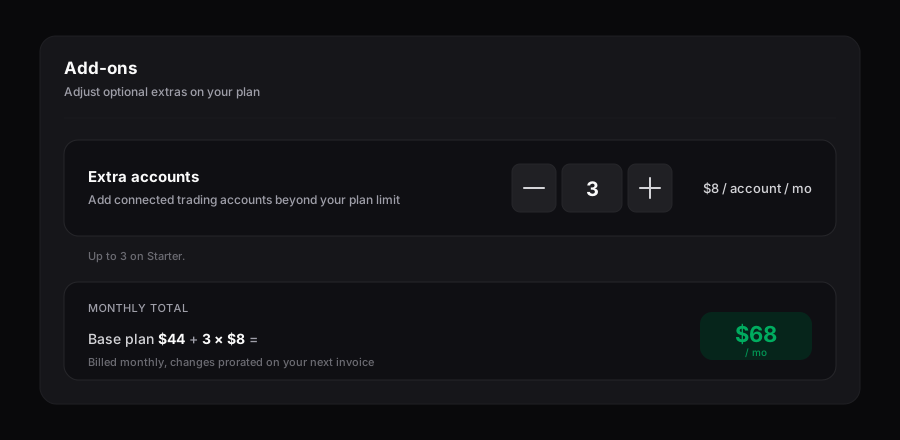
Add-ons let you connect more trading accounts than your plan includes, one account at a time, without moving to a higher tier. Each add-on raises your account ceiling by a single connected account; the per-account price depends on the plan you are on.
Extra-account add-ons — add capacity one account at a time.
## Understand how add-ons work
An add-on increases only your **connected account** limit. It does not change your copy-setup limit, and it does not change your plan tier — you stay on your current plan and pay a small monthly amount per extra account on top of your base price.
* The included account count comes from your plan (for example, Starter includes 5 accounts).
* Each add-on adds one account to that ceiling and is billed monthly per account.
* Add-ons are stackable up to a per-tier cap. Past the cap, the app recommends the next plan tier instead.
* Copy setups (master → follower configurations) are governed by your plan, not by add-ons.
{% hint style="info" %}
When you reach your account limit while connecting a new account, you can either add an extra-account add-on or upgrade your plan. Both paths are offered from the **Add Extra Accounts** flow.
{% endhint %}
## Review per-account pricing and caps
The price per extra account is lower on higher tiers. All prices are per account, per month, in USD.
| Plan | Included accounts | Per extra account / month | Add-on cap |
| -------------- | ----------------- | ------------------------- | ---------- |
| **Free** | 2 | $15 | 2 |
| **Starter** | 5 | $8 | 3 |
| **Pro** | 10 | $7 | 7 |
| **Elite** | 25 | $6 | 15 |
| **Enterprise** | 50+ | $5 | Custom |
Notes:
* Yearly subscribers keep the same per-account rate as their plan; add-ons follow the base plan's billing period (monthly with monthly, yearly with yearly).
* Enterprise caps and pricing are set in your contract. See [Plans overview](/plans-and-billing/plans-billing.md) or contact support for Enterprise details.
* When you hit an add-on cap, moving up a tier is usually cheaper per account than continuing to stack add-ons — the app surfaces this at the cap.
{% hint style="info" %}
Trada bills in USD only. There is no multi-currency support.
{% endhint %}
## Add extra accounts
{% stepper %}
{% step %}
### Open the Usage card
Go to your **Billing** page and find the **Extra Accounts** section on the **Usage** card.
{% endstep %}
{% step %}
### Start the flow
Click **Add Extra Accounts**. This opens the upgrade dialog with the extra-accounts section expanded, showing your current tier's per-account price.
{% endstep %}
{% step %}
### Choose how many to add
Select the number of extra accounts, up to your tier's cap. The dialog shows the resulting charge before you confirm.
{% endstep %}
{% step %}
### Confirm
On a paid plan, the extra accounts take effect immediately and the added cost is prorated to your existing cycle. On the Free plan, confirming creates a monthly subscription and the first charge is taken now.
{% endstep %}
{% endstepper %}
## Know how proration works
Add-ons are designed to keep you on a single billing charge rather than a separate schedule.
* **On a paid plan:** the extra account activates immediately. The added cost is prorated for the remaining days in your current cycle and folded into your next billing charge, so you keep one payment date.
* **On the Free plan:** adding an account creates a monthly subscription that starts right away, with the first charge taken at confirmation.
* **On upgrade or downgrade:** existing add-ons are re-prorated to match the new plan's per-account rate and billing period.
Because add-ons inherit your base plan's period, a yearly plan's add-ons renew yearly alongside it, and a monthly plan's add-ons renew monthly.
## Reduce or remove add-ons
Add-ons cannot be removed in the middle of a billing period. An extra account stays active — and billed — until the end of the current period.
{% hint style="warning" %}
There is no self-service mid-cycle removal for add-ons, and canceling a subscription is not self-service. To stop an add-on from renewing, or to reduce your add-on count, contact support before your period ends. The extra account remains active until the current period closes.
{% endhint %}
If you downgrade your plan while holding add-ons, the extra accounts remain active until the billing period ends. After that, any accounts beyond the new plan's limit are disconnected, keeping the two oldest connected accounts by connection date. You can reconnect accounts later within your new limits.
## Related
* [Plans overview](/plans-and-billing/plans-billing.md)
* [Upgrade or downgrade](/plans-and-billing/upgrade-downgrade.md)
* [Billing and invoices](/plans-and-billing/billing-invoices.md)
* [Connect an account](/connecting-accounts/connecting-accounts.md)
---
# Agent Instructions
This documentation is published with GitBook. GitBook is the documentation platform designed so that both humans and AI agents can read, navigate, and reason over technical content effectively. Learn more at gitbook.com.
## Querying This Documentation
If you need additional information that is not directly available in this page, you can query the documentation dynamically by asking a question.
Perform an HTTP GET request on the current page URL with the `ask` query parameter, and the optional `goal` query parameter:
```
GET https://docs.trada.io/plans-and-billing/add-ons.md?ask=&goal=
```
`ask` is the immediate question: it should be specific, self-contained, and written in natural language.
`goal` is optional and describes the broader end goal you are ultimately trying to accomplish on behalf of the user. GitBook uses it to tailor the answer towards what is most useful for that goal.
The response will contain a direct answer to the question and relevant excerpts and sources from the documentation.
Use this mechanism when the answer is not explicitly present in the current page, you need clarification or additional context, or you want to retrieve related documentation sections.