> For the complete documentation index, see [llms.txt](https://docs.trada.io/llms.txt). Markdown versions of documentation pages are available by appending `.md` to page URLs; this page is available as [Markdown](https://docs.trada.io/plans-and-billing/plans-billing.md).
# Plans & pricing
Trada's five plan tiers and what each includes — accounts, copiers, and add-ons.
Trada offers five plan tiers, from a free trial tier to custom Enterprise contracts. This page compares what each tier includes and how account and copier limits are counted. All prices are in US dollars (USD).
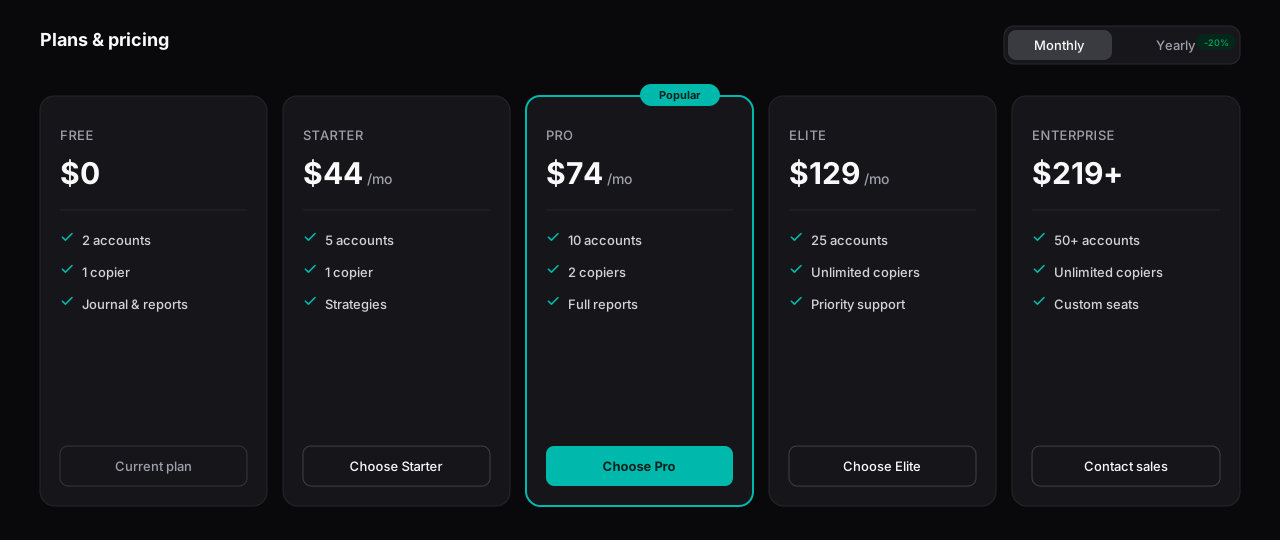
The five plan tiers, from Free to Enterprise, with account and copier limits.
## Compare the plans
| Plan | Monthly | Yearly | Accounts | Copiers |
| -------------- | ------- | ------ | -------- | --------- |
| **Free** | $0 | — | 2 | 1 |
| **Starter** | $44 | $440 | 5 | 1 |
| **Pro** | $74 | $740 | 10 | 2 |
| **Elite** | $129 | $1,290 | 25 | Unlimited |
| **Enterprise** | $219+ | Custom | 50+ | Unlimited |
* **Accounts** — trading accounts your copier can manage.
* **Copiers** — distinct sender-to-receiver configurations (for example, one master account mapped to three follower accounts). One market type per copier — Forex and Futures are never mixed in the same copier.
**Enterprise** is a custom contract for firms and educators running 50 or more accounts, with tailored seats and support. Pricing is negotiated — contact support to scope a plan.
## Count your account limit
Plan limits count **enabled** accounts, totalled **across Forex and Futures combined** — there is no separate Forex or Futures allowance.
{% hint style="info" %}
**Partner accounts are exempt.** An account connected from one of Trada's partnered prop firms or brokers does not count against your plan's account limit. See [Partner accounts](/connecting-accounts/partner-accounts.md). The partner list is expanding.
{% endhint %}
Disabling an account frees a slot; re-enabling it consumes one again. If you need more slots than your tier allows, you can add extra accounts (see below) or move up a tier.
## Choose monthly or yearly
Every paid tier can be billed monthly or yearly. Yearly billing saves roughly two months compared with paying month to month, and adds bonus accounts and copiers that apply on payment.
| Plan | Yearly bonus |
| -------------- | ------------------------------------------- |
| **Starter** | +2 accounts (7 total), +1 copier (2 total) |
| **Pro** | +3 accounts (13 total), +1 copier (3 total) |
| **Elite** | +5 accounts (30 total) |
| **Enterprise** | Set by contract |
{% hint style="info" %}
The **Free** tier has no yearly option — it stays at $0 with 2 accounts and 1 copier. Yearly bonuses apply only to paid tiers.
{% endhint %}
## Add extra accounts
If you reach your account limit but do not need a full tier change, you can buy extra accounts as monthly add-ons. The per-account price depends on the tier you are on — from $15/account on Free down to $5/account on Enterprise. See [Add-ons](/plans-and-billing/add-ons.md) for the full price table and stacking rules.
## Unlock Free Starter
Traders who connect a qualifying account from a partnered prop firm or broker can receive **Starter-tier features at $0** for a 30-day period that auto-renews while the qualifying criteria stay met. This is separate from the $0 Free tier — it grants Starter limits (5 accounts, 1 copier) at no cost. See [Free Starter (partner unlock)](/plans-and-billing/free-starter.md).
## Change or cancel your plan
Upgrades take effect immediately and are prorated; downgrades take effect at the end of the current billing cycle. See [Upgrade & downgrade](/plans-and-billing/upgrade-downgrade.md) for how each transition is handled.
{% hint style="warning" %}
Subscription cancellation is not self-service — contact support to cancel. On a downgrade, if you are over the new tier's limit, Trada keeps your two oldest connected accounts by connection date; review your accounts before a downgrade takes effect.
{% endhint %}
## Explore this section
* [Add-ons](/plans-and-billing/add-ons.md) — extra-account pricing and how add-ons stack.
* [Free Starter (partner unlock)](/plans-and-billing/free-starter.md) — qualifying criteria and how the 30-day grant renews.
* [Upgrade & downgrade](/plans-and-billing/upgrade-downgrade.md) — tier changes, proration, and cycle timing.
* [Billing & invoices](/plans-and-billing/billing-invoices.md) — saved cards, invoices, and payment history.
## Related
* [Quickstart](/getting-started/quickstart.md)
* [Partner accounts](/connecting-accounts/partner-accounts.md)
* [Add-ons](/plans-and-billing/add-ons.md)
* [FAQ](/reference/faq.md)
---
# Agent Instructions
This documentation is published with GitBook. GitBook is the documentation platform designed so that both humans and AI agents can read, navigate, and reason over technical content effectively. Learn more at gitbook.com.
## Querying This Documentation
If you need additional information that is not directly available in this page, you can query the documentation dynamically by asking a question.
Perform an HTTP GET request on the current page URL with the `ask` query parameter, and the optional `goal` query parameter:
```
GET https://docs.trada.io/plans-and-billing/plans-billing.md?ask=&goal=
```
`ask` is the immediate question: it should be specific, self-contained, and written in natural language.
`goal` is optional and describes the broader end goal you are ultimately trying to accomplish on behalf of the user. GitBook uses it to tailor the answer towards what is most useful for that goal.
The response will contain a direct answer to the question and relevant excerpts and sources from the documentation.
Use this mechanism when the answer is not explicitly present in the current page, you need clarification or additional context, or you want to retrieve related documentation sections.