> For the complete documentation index, see [llms.txt](https://docs.trada.io/llms.txt). Markdown versions of documentation pages are available by appending `.md` to page URLs; this page is available as [Markdown](https://docs.trada.io/sharing/certificates.md).
# Certificates
Share trade, period, report, and copier results as a read-only link.
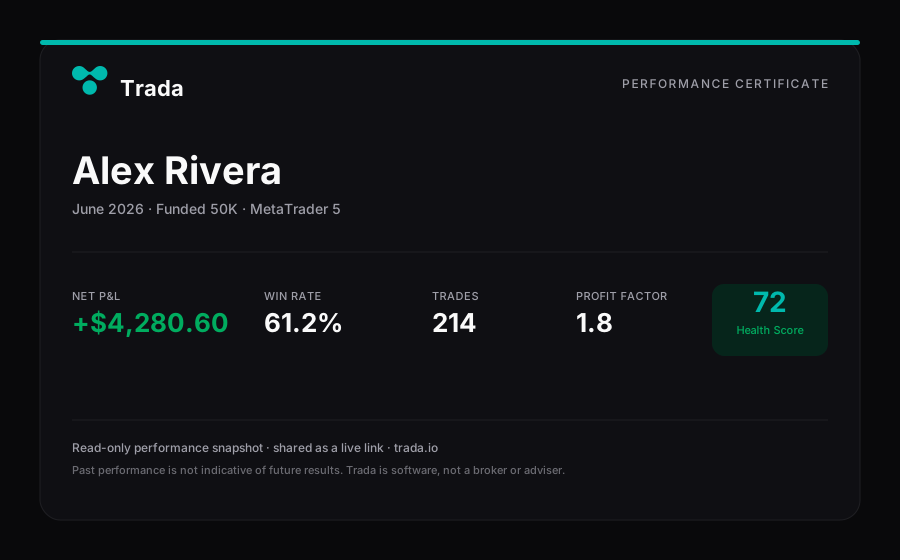
A certificate turns a single trade, a journal period, a report, or a copier into a read-only link you can share. It renders live from your data — there is no file to download and nothing to attach.
A performance certificate — a read-only card rendered live from your data, shared as a link (not a file).
{% hint style="info" %}
A certificate is a **read-only link**, not a document. It is rendered live (currently as an HTML/CSS card) from your account data — it is not a PDF, an image, or a downloadable file, and it is not a "professional certificate." Anyone who opens the link sees the current rendered card; they cannot edit it or see anything beyond what the card shows.
{% endhint %}
Certificates are available on every plan, including the free Starter tier. Generating one requires a connected account with at least one closed trade — with no data to render, the certificate is blocked and an empty-state message is shown instead.
## Choose a certificate type
There are four certificate types. Each starts from a different place in the app and summarizes a different scope of your data.
| Certificate | Start it from | What it summarizes |
| ----------- | ---------------------------------------------------- | ------------------------------------------------------------------------------------------------------------------------------------------------- |
| **Trade** | The share control on any trade in your trade history | One closed trade — symbol, side, entry and exit price, volume, P\&L, and close date |
| **Period** | A daily, weekly, or monthly card in your journal | Aggregated activity for one period — win rate, trade count, wins and losses, and totals for that period |
| **Report** | The share control on your report | Your report's filtered dataset, led by your **Health Score** — win rate, profit factor, winning days, max account loss held, trades, and hit rate |
| **Copier** | A copier card on the copy-trading page | Copier activity across the master account and its connected accounts |
{% hint style="info" %}
The **Report** certificate is built around consistency and process, not money. It leads with your Health Score and shows **no dollar amounts** — no P\&L, balances, or equity curve. It is a record of how you operate, not a claim about returns.
{% endhint %}
## Set the name shown on certificates
Every certificate displays the name from your **Certificate Name** setting, found under personal information in your account settings. You have three options:
| Option | Shows |
| -------------- | ------------------------------------------ |
| **Nickname** | A custom name or alias you enter |
| **First Name** | Your first name from your profile |
| **Full Name** | Your first and last name from your profile |
If you have not set a Certificate Name, certificates fall back to your **Full Name**. Set this before you share so the name renders the way you want.
## Create and share a certificate
The flow is the same for every type: open the certificate, then share the link.
{% stepper %}
{% step %}
### Open the certificate
Click the share control on the item you want to share — a trade in your history, a journal period card, your report, or a copier card. A dialog opens with a live preview of the card.
{% endstep %}
{% step %}
### Configure it (report and copier only)
The **Report** and **Copier** certificates open on a short configuration step where you set display preferences such as the name style and account filters. Click **Preview** to render the card, and **Back** to adjust your choices. Trade and period certificates skip this step and preview immediately.
{% endstep %}
{% step %}
### Check the preview
Confirm the name, scope, and figures read the way you expect. The card reflects your data at that moment — if a trade closes or a metric changes later, generate a fresh certificate to capture the update.
{% endstep %}
{% step %}
### Share the link
Use the channel buttons in the dialog to pass the link to common social and messaging apps, or copy the link to send it anywhere. The dialog stays open, so you can share to more than one channel in a row.
{% endstep %}
{% endstepper %}
{% hint style="warning" %}
A certificate link is public and read-only — anyone who receives it can open it. Share it deliberately, and only with people you intend to reach.
{% endhint %}
## Related
* [Share a public report](/reports-and-analytics/share-public-report.md)
* [Health Score](/reports-and-analytics/health-score.md)
* [Sharing overview](/sharing/sharing.md)
* [Journal](/journal/journal.md)
---
# Agent Instructions
This documentation is published with GitBook. GitBook is the documentation platform designed so that both humans and AI agents can read, navigate, and reason over technical content effectively. Learn more at gitbook.com.
## Querying This Documentation
If you need additional information that is not directly available in this page, you can query the documentation dynamically by asking a question.
Perform an HTTP GET request on the current page URL with the `ask` query parameter, and the optional `goal` query parameter:
```
GET https://docs.trada.io/sharing/certificates.md?ask=&goal=
```
`ask` is the immediate question: it should be specific, self-contained, and written in natural language.
`goal` is optional and describes the broader end goal you are ultimately trying to accomplish on behalf of the user. GitBook uses it to tailor the answer towards what is most useful for that goal.
The response will contain a direct answer to the question and relevant excerpts and sources from the documentation.
Use this mechanism when the answer is not explicitly present in the current page, you need clarification or additional context, or you want to retrieve related documentation sections.