> For the complete documentation index, see [llms.txt](https://docs.trada.io/llms.txt). Markdown versions of documentation pages are available by appending `.md` to page URLs; this page is available as [Markdown](https://docs.trada.io/why-trada/for-prop-traders.md).
# Built for prop firm traders
How Trada fits traders running multiple funded accounts across firms and platforms.
Trada is trade-copier and journaling infrastructure for traders running more than one funded account. Execution, per-account risk controls, and review live in one place, so nothing has to be exported or re-entered between them.
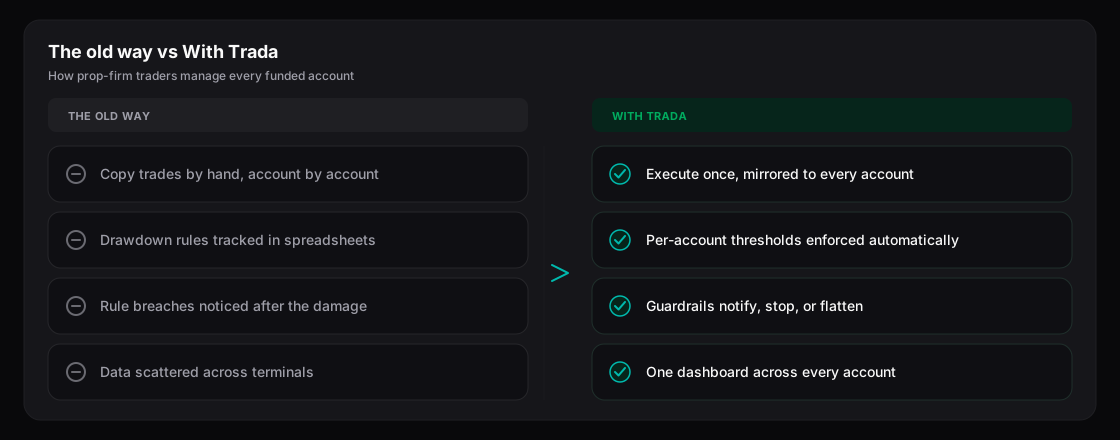
The old way versus Trada — for traders running multiple funded accounts.
## Run multiple accounts as one operation
Each account you connect keeps its own settings, risk rules, journal, and reports. You manage them from a single dashboard instead of switching between platforms and tracking positions in a spreadsheet.
Accounts can span both asset classes Trada supports today:
| Asset class | Platforms |
| ----------- | ---------------------------------------------------------------------- |
| Forex / CFD | MetaTrader 4, MetaTrader 5, cTrader, TradeLocker, DXTrade, MatchTrader |
| Futures | NinjaTrader, Rithmic, DXFeed |
cTrader connects through secure sign-in (OAuth); the others connect with the credentials or tokens each platform requires. Symbol mapping reconciles broker naming differences across accounts (for example `XAUUSD` and `GOLD`), so one master trade copies correctly to receivers on different platforms.
## Set risk controls for each account
Protection thresholds are configured per account, not globally. You define them against the account's balance and choose what Trada does when a threshold is reached.
| Control | Options |
| ---------------- | ----------------------------------------------------- |
| Threshold basis | Percentage or fixed USD amount of account balance |
| Horizon | Daily, Overall |
| Automated action | In-app alert, stop the copier, or flatten the account |
Because thresholds are set per account, an account operating under stricter limits can carry tighter rules than the rest without changing anything on your other accounts.
{% hint style="info" %}
Alerts are delivered in-app only. Trada does not send email or push notifications, and all threshold amounts are denominated in USD.
{% endhint %}
{% hint style="warning" %}
Flattening an account closes all of its open positions. This is an automated, irreversible protective action — review your threshold settings before enabling it.
{% endhint %}
## Keep prop-firm-aware defaults
When you mark an account as a prop firm account, Trada applies rule-aware defaults automatically. The clearest example: **Reverse Positions** is disabled on prop firm accounts. Inverting a master's direction is not appropriate under prop-firm conditions, so Trada takes that option off the table rather than leaving it to be switched on by mistake.
You still set your own thresholds and copier behavior — the defaults exist to keep the account's configuration consistent with how prop firm accounts are meant to be run.
## Get set up
{% stepper %}
{% step %}
### Connect a funded account
Add an account on any supported platform. cTrader uses secure sign-in (OAuth); the rest connect with the account credentials or tokens the platform requires.
{% endstep %}
{% step %}
### Mark it as a prop firm account
Flagging the account applies the rule-aware defaults, including **Reverse Positions** disabled.
{% endstep %}
{% step %}
### Set protection thresholds
Choose the Daily and Overall thresholds in percentage or USD, then pick the automated action — alert, stop the copier, or flatten the account.
{% endstep %}
{% endstepper %}
Every trade on a connected account auto-journals, and cross-account reports (including the Health Score) draw from the same data — no separate import step.
## Start on Free Starter
New accounts can begin on the **Free Starter** plan. Eligibility is tied to connecting an account with one of Trada's partnered prop firms and brokers.
{% hint style="info" %}
The partner list is expanding, so eligibility for **Free Starter** depends on which firm or broker your account is with. Check the current list before you rely on it.
{% endhint %}
## Related
* [Multi-platform support](/why-trada/multi-platform.md)
* [Risk protection](/copy-trading/configure-receiver/risk-protection.md)
* [Supported platforms](/connecting-accounts/supported-platforms.md)
* [Free Starter plan](/plans-and-billing/free-starter.md)
---
# Agent Instructions
This documentation is published with GitBook. GitBook is the documentation platform designed so that both humans and AI agents can read, navigate, and reason over technical content effectively. Learn more at gitbook.com.
## Querying This Documentation
If you need additional information that is not directly available in this page, you can query the documentation dynamically by asking a question.
Perform an HTTP GET request on the current page URL with the `ask` query parameter, and the optional `goal` query parameter:
```
GET https://docs.trada.io/why-trada/for-prop-traders.md?ask=&goal=
```
`ask` is the immediate question: it should be specific, self-contained, and written in natural language.
`goal` is optional and describes the broader end goal you are ultimately trying to accomplish on behalf of the user. GitBook uses it to tailor the answer towards what is most useful for that goal.
The response will contain a direct answer to the question and relevant excerpts and sources from the documentation.
Use this mechanism when the answer is not explicitly present in the current page, you need clarification or additional context, or you want to retrieve related documentation sections.