> For the complete documentation index, see [llms.txt](https://docs.trada.io/llms.txt). Markdown versions of documentation pages are available by appending `.md` to page URLs; this page is available as [Markdown](https://docs.trada.io/why-trada/multi-platform.md).
# Multi-platform by design
Forex and Futures breadth on both source and destination, with isolated cloud instances.
Trada is trade-copier and journaling infrastructure that connects to the trading accounts you already hold and replicates trades between them. The same platform breadth is available on both sides of a copier — the account sending trades and the account receiving them.
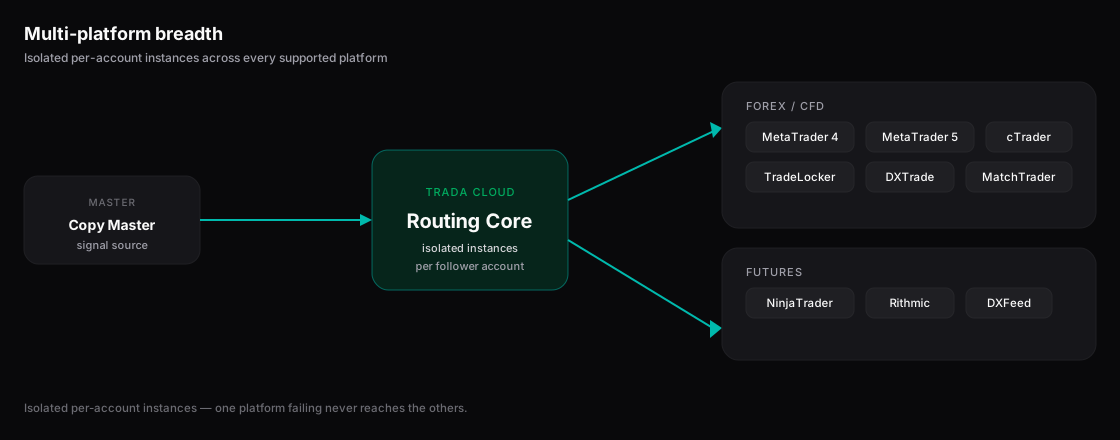
Multi-platform by design — one master, copied across Forex and Futures platforms.
## Connect across nine platforms
Trada connects to nine platforms spanning Forex/CFD and Futures. Each connected account is one trading account on one platform.
| Market | Platforms |
| ----------- | ---------------------------------------------------------------------- |
| Forex / CFD | MetaTrader 4, MetaTrader 5, cTrader, TradeLocker, DXTrade, MatchTrader |
| Futures | NinjaTrader, Rithmic, DXFeed |
Forex connections are flat — one login maps to one trading account. Futures connections are nested — one login can expose several trading accounts under it.
{% hint style="info" %}
**cTrader** connects through secure sign-in (OAuth), so Trada never handles your platform password for that connection. See [Supported platforms](/connecting-accounts/supported-platforms.md) for the per-platform connection method.
{% endhint %}
## Copy on both source and destination
A **Copier** maps one **Sender** (the master account) to one or more **Receivers** (the follower accounts). Because all nine platforms are supported for connection, a Sender on one platform can drive Receivers on different platforms, and each Receiver applies its own lot sizing, stop-loss/take-profit handling, and protection settings.
Trada resolves broker naming differences with per-Receiver **symbol mapping** (for example, `XAUUSD` on one broker to `GOLD` on another), so instruments line up across destinations. Trade replication runs in real time over WebSocket with a sub-second latency target.
{% hint style="info" %}
One Copier covers a single market type — Forex and Futures are not mixed inside the same Copier. Set up a separate Copier per market type.
{% endhint %}
## Run isolated cloud instances per account
Every connected account runs in its own isolated cloud instance rather than sharing one machine. Isolation keeps one account's connection state, credentials, and processing separate from every other account you connect.
MetaTrader 4 and MetaTrader 5 connections run as containerized cloud instances — there is no Windows VPS for you to rent, provision, or maintain. Trada operates the instance; you connect the account and manage the copier from the dashboard.
{% hint style="info" %}
A public API is not yet available. Integration with your accounts happens through the connection methods listed on [Supported platforms](/connecting-accounts/supported-platforms.md).
{% endhint %}
## Related
* [Supported platforms](/connecting-accounts/supported-platforms.md)
* [Connecting accounts](/connecting-accounts/connecting-accounts.md)
* [Copy trading](/copy-trading/copy-trading.md)
* [For prop traders](/why-trada/for-prop-traders.md)
---
# Agent Instructions
This documentation is published with GitBook. GitBook is the documentation platform designed so that both humans and AI agents can read, navigate, and reason over technical content effectively. Learn more at gitbook.com.
## Querying This Documentation
If you need additional information that is not directly available in this page, you can query the documentation dynamically by asking a question.
Perform an HTTP GET request on the current page URL with the `ask` query parameter, and the optional `goal` query parameter:
```
GET https://docs.trada.io/why-trada/multi-platform.md?ask=&goal=
```
`ask` is the immediate question: it should be specific, self-contained, and written in natural language.
`goal` is optional and describes the broader end goal you are ultimately trying to accomplish on behalf of the user. GitBook uses it to tailor the answer towards what is most useful for that goal.
The response will contain a direct answer to the question and relevant excerpts and sources from the documentation.
Use this mechanism when the answer is not explicitly present in the current page, you need clarification or additional context, or you want to retrieve related documentation sections.